🚀 Getting Started
What is Kookoobot AI?
Kookoobot AI is a highly sophisticated, fully automated algorithmic trading software built natively for MetaTrader 5. It utilizes advanced mathematical modeling combined with server-side AI assistance to execute high-precision trades on various currency pairs (primarily AUDCAD).
How much does it cost?
During our current BETA stage, Kookoobot AI is offered completely free of charge. We provide 60-day renewable certificates so users can test our technology in real-market conditions.
Is this software 100% automated?
Yes. Once installed and configured, Kookoobot AI handles everything—analysis, entry, trade management, and exits—without any manual input required.
Do I need Forex knowledge to use it?
No. The software is designed to be "plug and play." While understanding the basics of MT5 is helpful, the AI handles the complex strategy execution for you.
What is the minimum capital required?
The minimum starting balance is $1,000 USD. This is a mathematical requirement. Trading with less exposes you to immediate risk of a Margin Call during normal market fluctuations.
What are the minimum PC/VPS specs?
To ensure the AI's mathematical calculations and news processing run smoothly, we recommend:
- OS: Windows 10, 11, or Windows Server.
- CPU: 2.0GHz+ (Dual Core min).
- RAM: 4GB Min (8GB Recommended).
- Network: 10Mbps+ stable connection.
Can I run this on a Mac?
Not directly. Kookoobot is a Windows-native application. Mac users should use a Windows VPS (Highly Recommended) or software like Parallels Desktop.
What is a VPS and do I need one?
A Virtual Private Server (VPS) is a remote computer that stays online 24/7. It is highly recommended to use one to ensure your trades are never interrupted by power outages or internet drops. We recommend Contabo for reliable performance.
🧠 The AI Intelligence Engine
How exactly does the AI protect my account?
Kookoobot AI uses a multi-layered Intelligence Shield that works like a high-tech security system for your money. While normal trading bots only look at basic charts, our AI scans the entire global economy 24/7 to decide if it's a safe time to trade or if it's better to stay on the sidelines.
What is the "Global Mood Sensor"?
The AI senses when the global market is in a state of Panic or Calm. If the AI detects a global panic starting (like a sudden geopolitical event), it automatically tells the robot to be extra cautious or pause trading entirely until the "storm" passes.
How does it handle "Unstoppable" price moves?
Sometimes the market moves in a way that just won't stop. Our AI uses an Advanced Trend Detector that can tell the difference between a normal market "bounce" and an "unstoppable wave." If it senses a move is too strong to fight, it keeps the robot safe by preventing it from trading against that wave.
Does the AI follow "Big Bank" movements?
Yes. The AI is designed to follow the Institutional Footprints of the world's largest banks. It cross-references how the "Smart Money" is moving. If the big banks are staying away, our AI suggests you do the same, keeping you on the winning side of the market.
What is the "Early-Warning System"?
Australia and Canada are two of the richest resource nations on Earth. Our AI monitors Gold and Oil prices in real-time. Because these items affect the value of the AUD and CAD currencies, the AI can often see a move coming minutes or even hours before it actually shows up on the MetaTrader chart.
What happens during high-impact news events?
The AI has a built-in News Radar. It knows exactly when major central bank announcements are happening. During these high-risk windows, the AI activates a "Safety Buffer" to protect your balance from sudden, random market price jumps that can happen during news.
How does the AI handle "Breaking News" and Social Media?
The AI engine monitors premium news wires (like Bloomberg and Reuters) and influential social media headlines 24/7. It is designed to detect Highly Disruptive Events—such as sudden geopolitical conflicts or market-moving posts—before they fully impact the chart. This intelligence allows the robot to tighten its defenses or avoid entering new trades moments before a chaotic market move occurs.
Why does my dashboard say "RISK: AVOID"?
This is a Safety Feature. The AI has detected high-impact news, extreme volatility, or "dirty" market sentiment. During these times, the bot pauses new entries to protect your capital. It will resume automatically when conditions clear.
What is the "Rollover Pause"?
Every day at midnight (Server Time), brokers widen their spreads significantly. Kookoobot detects this and enters a Rollover Pause to prevent you from being "slipped" by the broker. Trading resumes once spreads stabilize.
Why does the robot only trade AUDCAD?
AUD and CAD are "Commodity Currencies" heavily tied to the price of Gold and Oil. This creates a highly predictable Macro Correlation that our AI uses to filter out market noise. By focusing on a single pair with deep commodity ties, the AI can achieve much higher precision than "multi-pair" bots that trade random volatility.
📈 MetaTrader 5 (MT5) Mastery
I deposited money but the EA still says $0?
This is the "Wallet Trap." When you deposit into IC Markets, the funds sit in your "Client Wallet." You must perform an Internal Transfer inside the IC Markets portal to move the funds from your Wallet to your specific MT5 Trading Account. The EA can only see money inside the MT5 account.
I cannot find AUDCAD in my MT5?
By default, MT5 hides many symbols. Go to the Market Watch panel on the left, right-click anywhere inside it, and select "Show All." You will then be able to find and open the AUDCAD chart.
MT5 says "Invalid Account" or "No Connection"?
This is usually caused by the Server Dropdown. Even if your password is correct, you must select the exact Server name (e.g., ICMarketsSC-MT5-Live03) from the dropdown that matches your welcome email. If you use a Live password on a Demo server, it will fail.
Which URLs must be authorized in MT5?
For the license system to work, you must add these URLs to Tools > Options > Expert Advisors > Allow WebRequest:
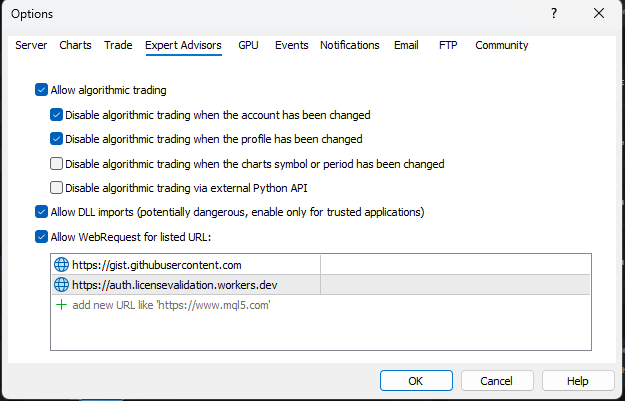
https://auth.licensevalidation.workers.devhttps://gist.githubusercontent.com
Can I change the chart timeframe while it's trading?
ABSOLUTELY NOT. This is the "Timeframe Death-Trap." Once you drag the EA onto an M15 chart, never click other buttons like H1 or D1. Changing the timeframe while trades are active will scramble the AI's internal calculations and can lead to major errors in trade management.
Can I close my laptop while the bot is running?
Only if you are using a VPS. If you are running the EA on your personal laptop, closing the lid or letting the computer go to sleep will disconnect the software from the market instantly. This is why we strongly recommend a VPS (Contabo).
Why is my "Algo Trading" button red?
The "Algo Trading" button at the top of MT5 must be Green. If it is red, click it to enable automated trading.
Why is IC Markets Raw Spread specifically required?
The AI's grid and recovery mathematics are optimized for Institutional-Grade Liquidity and near-zero pip spreads. Standard accounts have higher spreads that can eat into profits and delay the robot's ability to exit trades at the exact mathematical breakeven point.
Can I monitor the robot on my phone?
Yes! While the actual robot engine must run on a Windows PC or VPS, you can log into the MetaTrader 5 Mobile App on your smartphone using your IC Markets credentials. This allows you to watch your trades and profits in real-time from anywhere in the world.
🛠️ Technical Fix-It Guide (Troubleshooting)
The EA icon in the corner is Red/Frowning. Fix?
This means "Algo Trading" is disabled.
- Ensure the top MT5 button is Green.
- Right-click the chart -> Expert Advisors -> Properties -> Common tab -> Ensure "Allow Algo Trading" is checked.
- Ensure "Allow DLL imports" is also checked in the same tab.
I see a "License Authentication Failed" error?
This happens if MT5 cannot talk to our servers. Go to Tools > Options > Expert Advisors and ensure you have added the correct URLs to the WebRequest list (see mastery section).
MT5 says "Trade is Disabled"?
This usually means you have a "Standard" account instead of a "Raw Spread" account, or your broker has disabled trading for that specific symbol. Ensure you are using an IC Markets Raw Spread account.
The bot is attached but not opening trades?
Check the following:
- Is the Risk level "Avoid"? (Wait for better conditions).
- Is the Spread too high? (Check your Market Watch).
- Is it the weekend? (Markets are closed).
- Do you have enough Free Margin?
🖥️ Dashboard Guide
What is the "Summary" tab?
This is your command center. It provides an Immediate and Weekly Outlook on the market.
.jpg) It rates "Trend Possibility" and "Reversal Possibility" in percentages, helping you see if the AI is currently favoring a continuation or expecting a market turn.
It rates "Trend Possibility" and "Reversal Possibility" in percentages, helping you see if the AI is currently favoring a continuation or expecting a market turn.
It rates "Trend Possibility" and "Reversal Possibility" in percentages, helping you see if the AI is currently favoring a continuation or expecting a market turn.
How do I read the "Risk" tab?
The Risk tab displays Trading Safety Levels.
.jpg) It gives a percentage score for opening "New" trades versus "Adding" to existing ones. If you see "Avoid" or "Critical" levels, it means the AI's safety filters have detected high-risk conditions and are restricting entries to protect your capital.
It gives a percentage score for opening "New" trades versus "Adding" to existing ones. If you see "Avoid" or "Critical" levels, it means the AI's safety filters have detected high-risk conditions and are restricting entries to protect your capital.
It gives a percentage score for opening "New" trades versus "Adding" to existing ones. If you see "Avoid" or "Critical" levels, it means the AI's safety filters have detected high-risk conditions and are restricting entries to protect your capital.
What are the "Insights" and "Headlines" tabs?
These tabs show the "Brain" of the AI. Insights provides a written summary of the macro-economic drivers affecting AUDCAD.
.jpg)
.jpg) Headlines pulls real-time news data and gives a "Verdict" on how that news impacts the current trading bias.
Headlines pulls real-time news data and gives a "Verdict" on how that news impacts the current trading bias.
What does the "Sentiment" and "Correlations" gauge show?
The Sentiment tab measures global risk appetite. The Correlations tab shows how external assets like Gold, Oil, and the US Dollar (DXY) are impacting your trades.
.jpg)
.jpg) Since AUD and CAD are heavily tied to commodities, this helps the AI predict moves before they happen on the chart.
Since AUD and CAD are heavily tied to commodities, this helps the AI predict moves before they happen on the chart.
🧠 AI Engine & Intelligence
What specific news data does the AI monitor?
Unlike standard bots, Kookoobot AI monitors 29+ Global News Feeds in real-time. This includes high-impact events like GDP, CPI, and Interest Rate decisions. If the AI detects a "High Risk" economic event, it automatically enters "Avoid" mode to protect your balance.
What is the "AI Accuracy Benchmark"?
The engine operates with an 87%+ Accuracy Benchmark for signal filtering. This means it rejects over 80% of potential trade setups that don't meet its strict institutional-grade criteria, focusing only on the highest probability moves.
How many protection layers are active?
There are 12+ Layered Protection Systems running simultaneously, including a Correlation Shield (monitoring Gold/Oil/DXY) and an Asymmetric Grid logic that prevents "Runaway Trend" exposure.
Does the AI understand commodity correlations?
Yes. Because AUD and CAD are "Commodity Currencies," the AI specifically tracks the price of Gold and Crude Oil. It knows that if Oil drops significantly, the CAD usually weakens, and it adjusts its trading bias before the move even shows up on the AUDCAD chart.
What makes this different from a standard "Grid" EA?
Standard grids are "blind" and will keep adding trades until the account blows. Kookoobot AI is Macro-Aware. It only uses its grid logic when the economic environment is favorable, and it uses asymmetrically weighted lot sizes to ensure the "mathematical recovery" happens much faster than traditional systems.
🏆 Proven Performance
What kind of results can I expect?
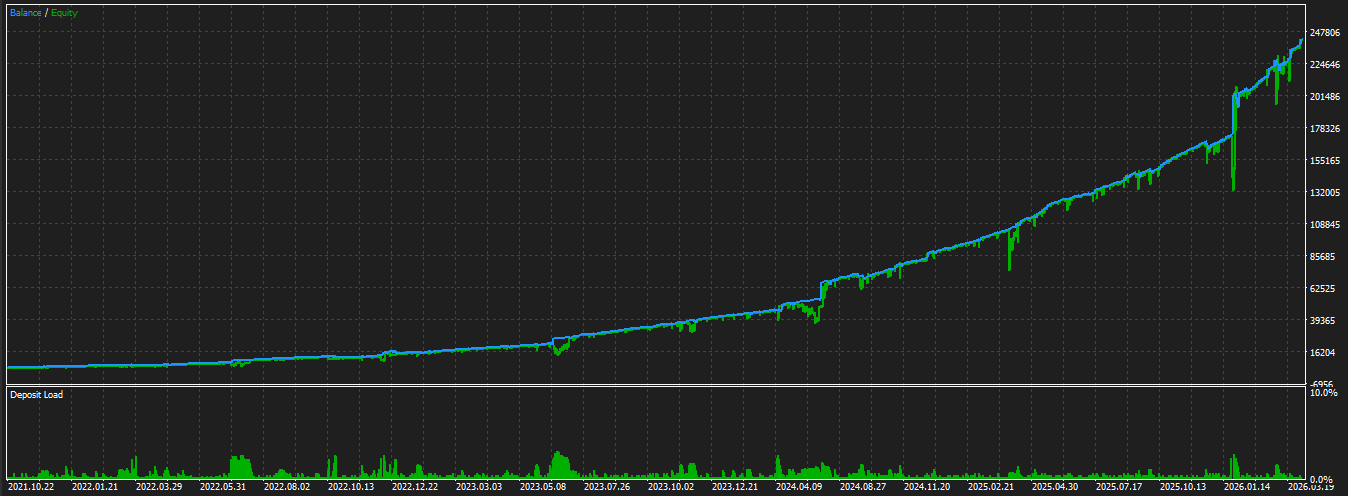
In institutional-grade backtests spanning several years, Kookoobot AI has demonstrated the ability to turn a $5,000 initial deposit into over $237,000 in net profit.
This represents a 4753% total return with a mathematical average of 7.4% monthly compounding growth.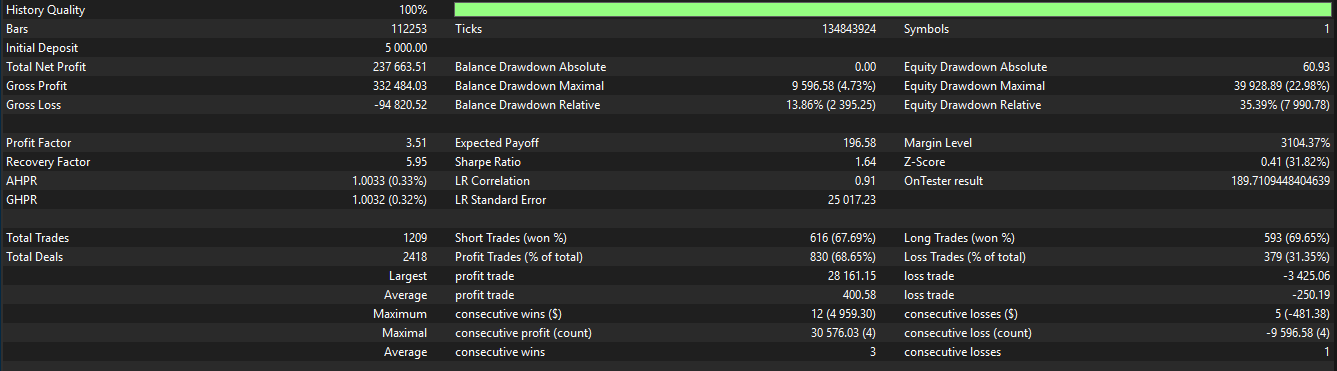
 Please remember that past performance is not a guarantee of future results.
This represents a 4753% total return with a mathematical average of 7.4% monthly compounding growth.
Please remember that past performance is not a guarantee of future results.
What is the exact period covered by the V1.08 backtest?
The current institutional report spans from October 2021 to April 2026 (54 months). This period was selected because it includes post-pandemic recovery, high-inflation cycles, and major geopolitical shifts, proving the AI's resilience across diverse market conditions.
💰 Financials & Risk
Can I make a withdrawal whenever I want?
While you technically can withdraw at any time from your broker, it is strongly advised to wait until all active trades are closed. A withdrawal while trades are running can reduce your available margin and risk a margin call or unnecessary losses.
How is risk managed?
Kookoobot AI features built-in volatility detection, news filters, and rigorous money management logic. We prioritize the preservation of capital through mathematical hedging and diversification across timeframes.
What is a Margin Call?
A Margin Call occurs when your account's equity falls below a certain percentage of the required margin to maintain your open trades. To avoid this, always maintain the recommended $1,000+ balance and never withdraw funds while trades are active.
What is the absolute minimum balance to start?
While the robot can technically function on smaller amounts, we strictly recommend a minimum of $1,000 USD. This ensures your account has enough "Breathable Margin" to support the recovery logic during volatile market swings without risking a margin call.
🛡️ Legal & Security
Is Kookoobot AI a financial advisor?
No. Kookoobot AI is strictly trading software and a technical tool. We do not provide financial advice, investment management, or trading signals. All configurations and the decision to run the software are made exclusively by the user.
Is my data secure?
Yes. We use proprietary encrypted technical metadata for licensing. We never have access to your broker password or your funds. Your money stays in your private IC Markets account.